Showing posts with label Tools. Show all posts

Thursday, October 13, 2011

Conversation Mode of Google Translate for Android is available on more languages.


Google announced that Conversation Mode of Google Translate for Android is available on more languages, now support English, Spanish, Brazilian Portuguese, Czech, Dutch, French, German, Italian, Japanese, Korean, Mandarin Chinese, Polish, Russian and Turkish.

To use Conversation Mode, speak into your phone’s microphone, and the Translate app will translate what you’ve said and read the translation out loud. The person you’re speaking with can then reply in their language, and Conversation Mode will translate what they said and read it back to you.


details: http://googlemobile.blogspot.com/2011/10/start-conversation-with-google.html

Tuesday, August 30, 2011

Elixir 2, know everything about your device


Do you want to know everything about your device? Try Elixir 2 and its widgets!

Elixir 2 is a system information application with highly configurable widgets.

What is new in 2.0: http://bartat.hu/elixir#whatisnew


Features:

- open system screens easily from one place

- displays information about battery, internal and external storage (sd card), cpu, memory, telephony, wifi, bluetooth, location, display, airplane mode, synchronization, audio, camera, camcorder, input devices, build, operating system, settings, configuration, clipboard, environment variables, features, java system properties, shared libraries

- change settings (brightness, screen timeout, volume, ringer mode), do actions (mount/unmount sd, clear cache, start bluetooth discovery, view location, ...), turn things on/off (apn, wifi, bluetooth, auto-brightness, rotation, ...) on information screen

- displays installed applications: code, data and cache size; launch, uninstall, clear cache, move to sd, organize applications by labels

- displays running processes / services / tasks: pid, cpu usage, memory usage, total cpu, view logs of a process, kill background processes

- displays output of the top linux command

- shortcuts to widgets, application labels or Elixir screens

- statusbar icon can display memory/battery/cpu usage via circle/bar/percent/elixir/transparent icons

- displays sensor information, turn sensors on/off, microphone

- generating and sending reports

- view online documentation from the app

- displays logcat/dmesg logs


Widgets:

- multiple widget sizes, each can be disabled

- small widget icons, up to 7*7 icons per screen.

- open widget from shortcuts, put to the notification area or to the home screen.

- widget performance screen

- customize widget icons by icon packs

- various widget backgrounds, changeable transparency

- change label position/color/size, hide labels

- backup/restore widget definitions

- change image, label, refresh rate of widget types


Widget icon types:

- application launcher

- contact

- shortcut: bookmark, contact, setting, ...

- battery

- battery current

- battery temperature

- internal storage

- external storage

- cpu usage

- cpu frequency

- cpu usage * frequency

- memory

- running applications count

- e-mail unread count: gmail or any imap server

- missed calls count

- messages unread count

- time

- uptime

- date

- next alarm

- mobile signal strength

- mobile traffic

- wifi signal strength

- wifi traffic


Widget toggles:

- apn

- wimax (4g)

- wifi

- wifi ap (hotspot)

- bluetooth (2 or 3 state)

- gps

- airplane mode

- auto-brightness

- brightness (can set levels)

- auto-rotate

- lock

- screen timeout (can set levels)

- screen

- auto-sync

- sync all

- speakerphone

- ringer mode

- sd mount

- sd refresh

- flash (needs TeslaLED Flashlight)

- mute

* shortcut: bookmark, contact, setting, ...


Languages:

- english

- magyar

Saturday, August 27, 2011

AndroSensor: all-in-one diagnostic tool!


AndroSensor started as a simple showcase of all the sensors your android device has, yet it has become the absolute all-in-one diagnostic tool that lets you know virtually everything about your device's status.


View in a single screen the data from all device's sensors in real time.

- location, location provider, accuracy, altitude and speed

- Google maps to show the above info. Tapping on your location shows your address, postal code and location accuracy (if available)

- accelerometer readings,

- gyroscope readings,

- light sensor value,

- ambient magnetic field values,

- device orientation

- proximity sensor readings

- pressure sensor (barometer)

- temperature readings

- battery status, voltage, temperature and health

- sound level meter (decibel)

- If your device supports it, next to the sensor's name, you will see how much power the sensor consumes per hour in mA.


Press MENU to toggle settings, determine which sensors you wish to monitor, see device info, system log file or the list of sensors that are unavailable for your device.

- Device info gathers as much as it can and prints it out in a simple and easy-to-read view. Mobile signal strength, wifi info, CPU architecture, available and total RAM, internal and external memory, display metrics, OpenGLES version and kernel version are a small part of the information displayed. Clicking on a line copies it's content to clipboard. A multitouch test is also available, so you can see how many simultaneous touch events your screen supports.

- Log view prints out the last ~100 lines of the device system log file, as in logcat. Saving or mailing the log will give you access to the full log file.

- AndroSensor never runs in background, so it does not consume battery while you don't use it.

- Supports Apps2SD.

- Enabled for Android 3.0 (Honeycomb) and tablets.


Languages supported: English, Greek, Italian, Russian, Spanish, French, German, Hungarian

Thursday, August 11, 2011

NEW! Norton™ Mobile Security Lite for free on Android

Norton™ Mobile Security Lite

Norton™ Mobile Security Lite

NEW! Norton™ Mobile Security Lite protects your mobile device against loss, theft and malware. Norton lends its anti-malware and security expertise to mobile. Your life and your important stuff is on your phone. Keep it safe with Norton™ Mobile Security Lite for Android.


FREE ANTIMALWARE PROTECTION that eliminates viruses and malware before they infect your phone:

  • Automatic virus scan for downloaded apps and app updates to protect against threats
  • Detects and removes mobile security threats cybercriminals use to steal your personal info, spam you with texts, or take control of your phone
  • Option of scanning SD card (Secure Digital) data for threats when inserted into your phone with advanced virus protection


REMOTE LOCK allows you to remotely lock your phone if it is lost or stolen:

  • Remotely place a security lock on your phone with a simple text message so thieves can’t access your info or run up your bill
  • Protects your private information from prying eyes in case your device is lost or stolen


ALWAYS FAST and easy to use, Norton Mobile Security won’t slow you down:

  • Download and install your security app with just a few clicks
  • Seamlessly checks for updates every week for the most up-to-date protection
  • Won’t use up your phone’s resources or slow down your web browsing
  • Won’t drain your battery


Saturday, July 16, 2011

MultiTouch Tester


MultiTouch Tester shows your touch points with a nice UI and keep the maximum count on screen.

For multi-touch testing only.

Shows your touch points with a nice UI and keeps the maximum count on screen.

Some devices may have problems with multi-touch. (Touch points closing to each other or crossing the same axes will get reverse action, etc.)

Thursday, June 9, 2011

Gesture Search: Search your Android phone by drawing gestures on the touch screen.

Gesture Search
Gesture SearchGesture Search lets you quickly find a contact, a bookmark, an application, or a music track on your device by drawing on the screen. Search results are updated as you add each letter or digit and becomes better by learning from your search history.

Saturday, June 4, 2011

Quadrant Standard Edition: compute benchmark of your Android

Quadrant is a CPU, I/O and 3D graphics benchmark. The Quadrant Standard Edition requires an Internet connection to compute benchmark results and is supported by ads.
The application does not work on devices with no GPU (Spica, Tattoo). Nexus S is not yet supported.

Thursday, March 31, 2011

SyncMate for Android


Sync your Android device with your Mac. This special Android module of SyncMate will help you sync your Android device with a Mac via Wi-Fi, USB or Bluetooth. You can synchronize contacts, calendars, folders, Safari bookmarks, iTunes and iPhoto; mount your Android as a new volume on a Mac, manage your text messages (SMS) conveniently and more. Check it out!

SyncMate for Android is just a sync client app. The main sync software should be installed on your Mac (go to http://mac.eltima.com for additional download).


SyncMate - Mac synchronization:

SyncMate is a versatile sync tool which allows you syncing data between your Mac and various devices and accounts within one app. You can sync your Mac with Windows Mobile, Nokia S40 and Android phones, other Macs or PCs, Google accounts, USB drives, Sony PSP and back up data online.
You don't need to install many apps to achieve that - just one SyncMate!

Friday, February 4, 2011

Samsung TV Remote Android App


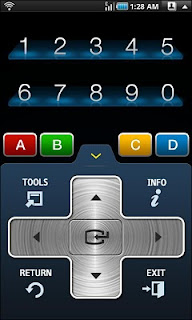
Samsung TV Remote is Wi-Fi remote control of Samsung Internet@TV for 2010. If both your Android device and TV were connected to the same access point, your Android device is linked with TV automatically and you can use your phone like general remote.

- Models supported
All SAMSUNG TVs working Internet@TV 2010 (Model code'C')

Adroid Market Links:
- Samsung TV Remote
- Samsung TV Remote-Tab

Thursday, February 3, 2011

Do you want to send "♥" in this February?


Do you want to type "I♥U" in your Android?

Lovely Words: You can type special character such as ♥, ♪, ∞, α, ß, Å... and then copy to clipboard for use in other apps.

Touch and hold on the keys to copy to clipboard directly.

10 EasyKeys, you can assign your favorite symbols for easy accessing.

- More characters will be added in future.
- Support Move to SD.


Thursday, January 27, 2011

UpSoundDown


UpSoundDown is a speakerphone tool! While you're on a call, just flip the phone upside down, or lay it down on a table to turn on the loud-speaker. To shut speaker-phone off, just pick the phone up, upright. Simple, quick and fun.

Ubuntu Countdown Widget on Android


Ubuntu Countdown Widget: keep an eye on the days remaining before the new Ubuntu release!

Features:
* Two square widgets (1x1 and 2x2)
* Ability to set a custom date
* Built with an eye on battery consumption (widget refresh at most twice a day)
* It looks awesome! (thanks to Martín Césare)

Monday, January 24, 2011

Green Power FREE battery saver


Green Power FREE battery saver brings many extra hours to your battery life!

Unlike other battery savers that require regular user manual actions, Green Power is fully automatic: Once configured, it runs and saves your battery by itself. It does so by smartly managing Wifi and Mobile data: Turning them off when you don't need them, but ensure minimum disturbance: Automatic turned ON when needed by you or by other apps (e.g retrieving mails).
Similar but easier cleaner and faster than JuiceDefender and BatteryFu!

Features:
* Supports most phone types (including CDMA) and most carriers
* Keep wireless (wifi and/or mobile data) OFF most of the time to save power
* Fully configurable time intervals and settings
* Toggle wireless ON regularly to update push data (e.g mails, weather...)
* Toggle wireless ON when Screen turned ON, or unlocked
* Toggle wireless ON when Power connected
* Checking traffic before turning OFF to prevent disturbing other apps
* Very lightweight and fast app
* Easy and clean interface

This FREE version is ad-supported.
Get PREMIUM version to get rid of ads and get extra features.

Saturday, January 15, 2011

AsciiTable


AsciiTable is a ASCII Table app, with extended ASCII (0x80-0xFF) of charset windows-1252/ISO-8859-1.

Recent changes:
Add:
- Move to SD
- Copy to Clipboard
- Search

Wednesday, January 12, 2011

Google Translate updated


Google Translate updated with new look and feel for entire application. And introduce Conversation Mode view for English-Spanish translation (in alpha).

Use Google Translate to instantly translate text between more than 50 languages.

Featuring:

* Dictionary results
* Text-to-speech
* Voice input
* Romanization (e.g. Pinyin, Romaji, etc)
* History/star favorite translations


Translate supports 53 languages, from Afrikaans to Yiddish, and voice input for 15 languages. You can download the application, available for devices running Android 2.1 and above, by searching for “Google Translate” in Android Market or by scanning the QR Code below.

Wednesday, January 5, 2011

Network Speed Monitor Widget


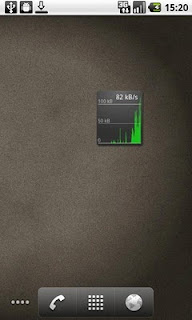
Network Speed Monitor Widget: Real-time network traffic speed Widget 1x1 size. Shows current bandwidth & traffic graph. Helps to monitor network statistics online.

Add widget to your Home screen after installation.

Tuesday, December 28, 2010

Battery Doctor max and extend your Battery life.


Battery Doctor max and extend your Battery life.
1:Support Full cycle charge.
2:Help you to kill tasks quickly and reset your phone easily!
3:Show battery health,temperature,talktime etc.

To improve your phone's battery,you should kill running tasks,adjust screen brightness(volume),turn off wifi,gps,bluetooth,Auto-sync etc.
Improve your battery life up to 30%-50%!

Monday, December 27, 2010

SMS Backup +


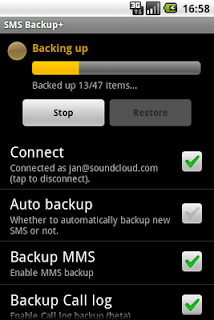
SMS Backup + automatically backup SMS, MMS and call log entries using a separate label in Gmail / Google Calendar. It is also possible to restore SMS back to the phone (MMS and call log restore not supported yet).

Remember to enable IMAP in Gmail and set the correct time/zone.

GetQR! QR code easy make,share


GetQR! QR code easy make,share!

1.QR code
Easy to make Web, Android market install QR code.

2.QR code Share
You can share QR code with others via Email, Gmail,FaceBook and…etc.

3. QR code Cloud computing
QR code is generated by Cloud computing, It's stable and tiny, need not install extra QR code Library.

Friday, December 17, 2010

Google TV Remote, by Google Inc.


Google TV Remote turn your Android device into a fully functional Google TV remote! Use the mouse pad, arrow keys, and the full range of buttons. You can also share videos and web pages with the TV and even use your voice to search for content.

To get started, connect your Android device to the same network as your Google TV.